 David Straub
External Search in Gramps Web – Connect to Genealogy Websites
Genealogical research often means checking the same information across multiple websites – searching for a person on FamilySearch, then Ancestry, then regional repositories, entering names and dates over and over. The new external search feature in Gramps Web v25.12 streamlines this workflow by connecting your family tree directly to external genealogy services.
What is External Search?
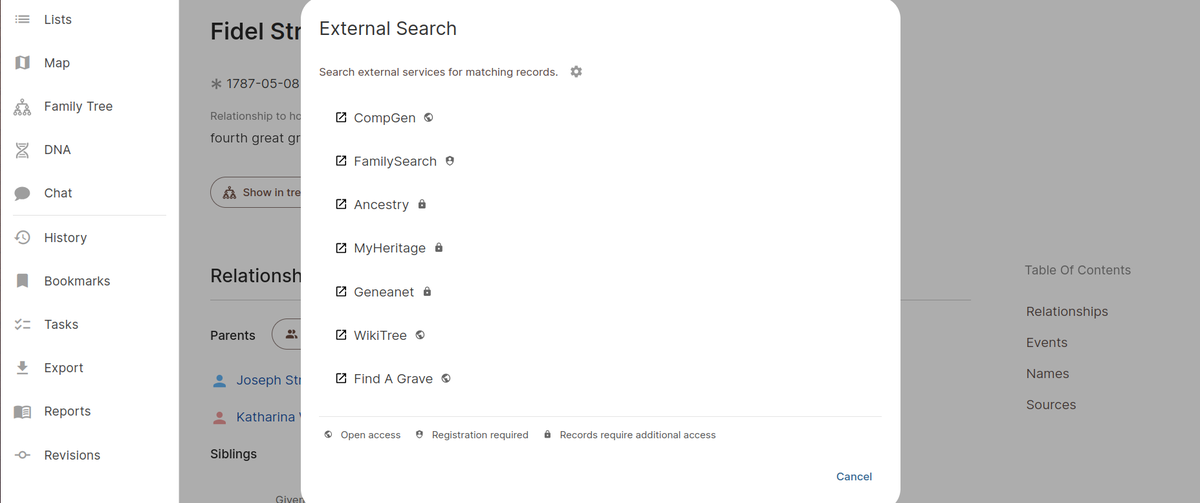
External search adds a button to the person detail view that opens a curated list of genealogical websites. Clicking on any of these links automatically searches that website for the person you’re viewing, with their name, birth and death places, and other relevant details already filled in. No more copying and pasting or retyping information as you move between services.
The feature currently includes CompGen, FamilySearch, Ancestry, MyHeritage, Geneanet, WikiTree, and Find a Grave. Inspired by the web connect addon from Gramps desktop, it brings the same convenience to the web interface.
How It Works
Using external search is straightforward. When viewing a person’s details, click the external search button to see a popup with links to various genealogy websites. Each link opens a pre-filled search on that service, ready for you to review the results. It’s that simple.
For detailed instructions on using the feature, see the Gramps Web documentation.
Tailoring to Your Research
Not every researcher needs every service. You might not have subscriptions to certain websites, or some services might focus on regions that aren’t relevant to your family history. External search lets you hide the providers you don’t need, keeping your popup clean and focused on the services you actually use.
Even more useful is the ability to add custom search engines. Genealogical research is inherently local – there are countless regional archives, specialized databases, and country-specific repositories that aren’t part of any global platform. With custom search engines, you can connect Gramps Web to the specialized services that matter most for your research, whether that’s a local church archive, a regional historical society, or a specialized database for a particular ethnic group or profession.
Why This Matters
External search removes friction from the research process. While you’ll still work across multiple browser tabs as each search opens in a new window, the feature eliminates the repetitive task of manually entering names, dates, and places into each website’s search form. The feature saves time on data entry, letting you focus on the actual research – evaluating sources, making connections, and discovering new information about your ancestors.
It’s worth noting that this feature doesn’t change anything about your privacy or data protection. External services don’t gain access to your Gramps Web database. When you click a search link, only the specific search parameters – such as a person’s name, birth year, or location – are sent to the external website through the URL, just as if you had manually entered them into that site’s search form.
Looking Forward
The v25.12 release caps off an excellent year for Gramps Web, which surpassed 1000 stars on GitHub and continues to see regular contributions from the community. The external search feature reflects the project’s commitment to making genealogical research more efficient and accessible, building on the strong foundation of the Gramps ecosystem.
As always, the open source community plays a vital role in shaping these features. If you have suggestions for additional default providers or ideas for improving external search, the Gramps forum is a great place to share your thoughts.